
Browser-in-the-Browser Kit Uses Fake Software Errors to Deliver Malware Installers
Palo Alto Networks Unit 42 discovered a BitB campaign that fakes software error pop-ups inside realistic browser windows to trick users into downloading malware installers.

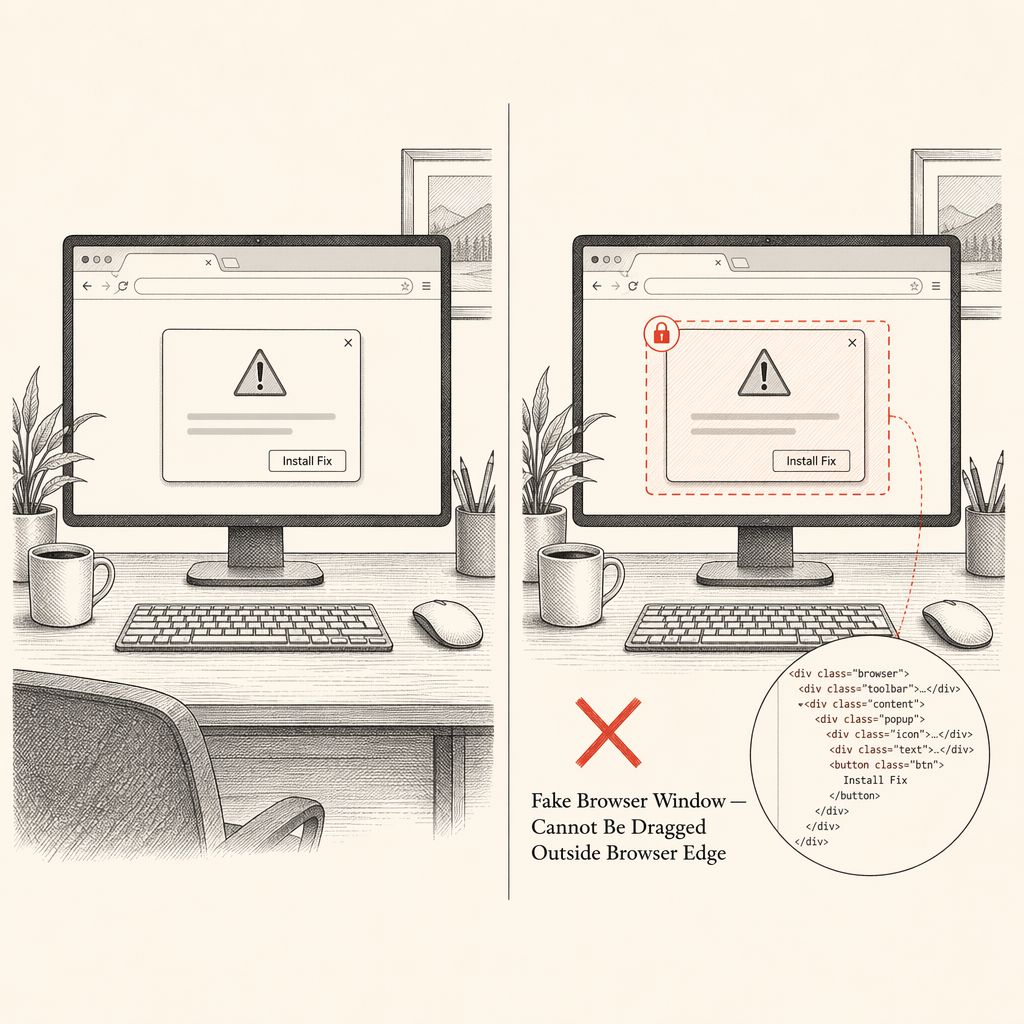
A newly identified attack campaign is using a sophisticated Browser-in-the-Browser (BitB) kit to trick users into downloading malware disguised as legitimate software installers. The technique combines convincing fake browser pop-ups with fabricated error messages to manipulate victims into taking actions they believe are routine and safe. The campaign marks a notable evolution in how phishing kits are being weaponized. Rather than simply stealing login credentials, this operation goes a step further by pushing malicious installer files directly to victims' devices.
The attackers have built a social engineering chain that feels entirely natural to the average user, making it harder to detect before damage is done. Researchers from Palo Alto Networks' Unit 42 team identified and documented this activity, sharing findings in a report with Cyber Security News. According to Unit 42, the kit is actively being used to distribute malware installers through realistic-looking browser windows that mimic trusted software environments. What makes this campaign stand out is how it weaponizes user frustration. Fake software error messages are generated inside the spoofed browser window, prompting victims to download what appears to be a fix or update.
The Browser-in-the-Browser technique works by rendering a fake browser window entirely within a webpage using HTML and CSS code. The simulated window includes a convincing address bar showing a trusted URL, which makes victims believe they are interacting with a legitimate site or application. In this campaign, the kit takes that deception further. Once the fake window loads, it displays a fabricated software error notification, warning the user that a required component is missing or corrupted. The user is then prompted to download an installer file to resolve the issue. That file, however, contains malware.
The infection chain is clean and fast. A user visits a compromised site, a fake browser pop-up appears, a convincing error message is shown, and the malware installer is downloaded. Each step is designed to feel normal. There are no obvious red flags until the installer runs and the payload is delivered. One practical way users can spot a fake BitB window is by trying to drag the pop-up outside the main browser window. A real browser pop-up can be moved freely across the screen, while a fake one embedded in a webpage will stop at the browser's edge and cannot be pulled beyond it.
Traditional security tools struggle with BitB-based attacks because the malicious activity begins inside a legitimate-looking webpage interaction. There is no unusual network request at the start, no suspicious executable launched immediately, and no obvious phishing URL to block. The attack exploits user behavior rather than a software vulnerability. Unit 42's broader research has consistently shown that browser-based intrusions are becoming a primary entry point for attackers in 2026.
Hardening the browser environment and training users to verify pop-up authenticity are among the recommended defensive measures. Organizations should also deploy endpoint detection tools capable of flagging unsigned or unexpected installer files before they are executed. Security teams are advised to monitor for unexpected MSI or EXE file downloads triggered from browser sessions, especially those originating from unfamiliar domains. Keeping browser security policies updated and restricting installer execution for standard users can significantly reduce the risk.